Integrating CodeScene with Bitbucket Pull Requests
CodeScene can be seamlessly integrated into your Bitbucket workflow to provide automated code reviews and enforce quality gates on Pull Requests. This integration helps your team detect potential issues early and maintain high code quality before merging changes into the main branch.
Step 1: Open the Pull Request Integration Settings
Navigate to your project configuration in CodeScene.
Go to the Pull Request Integration tab.
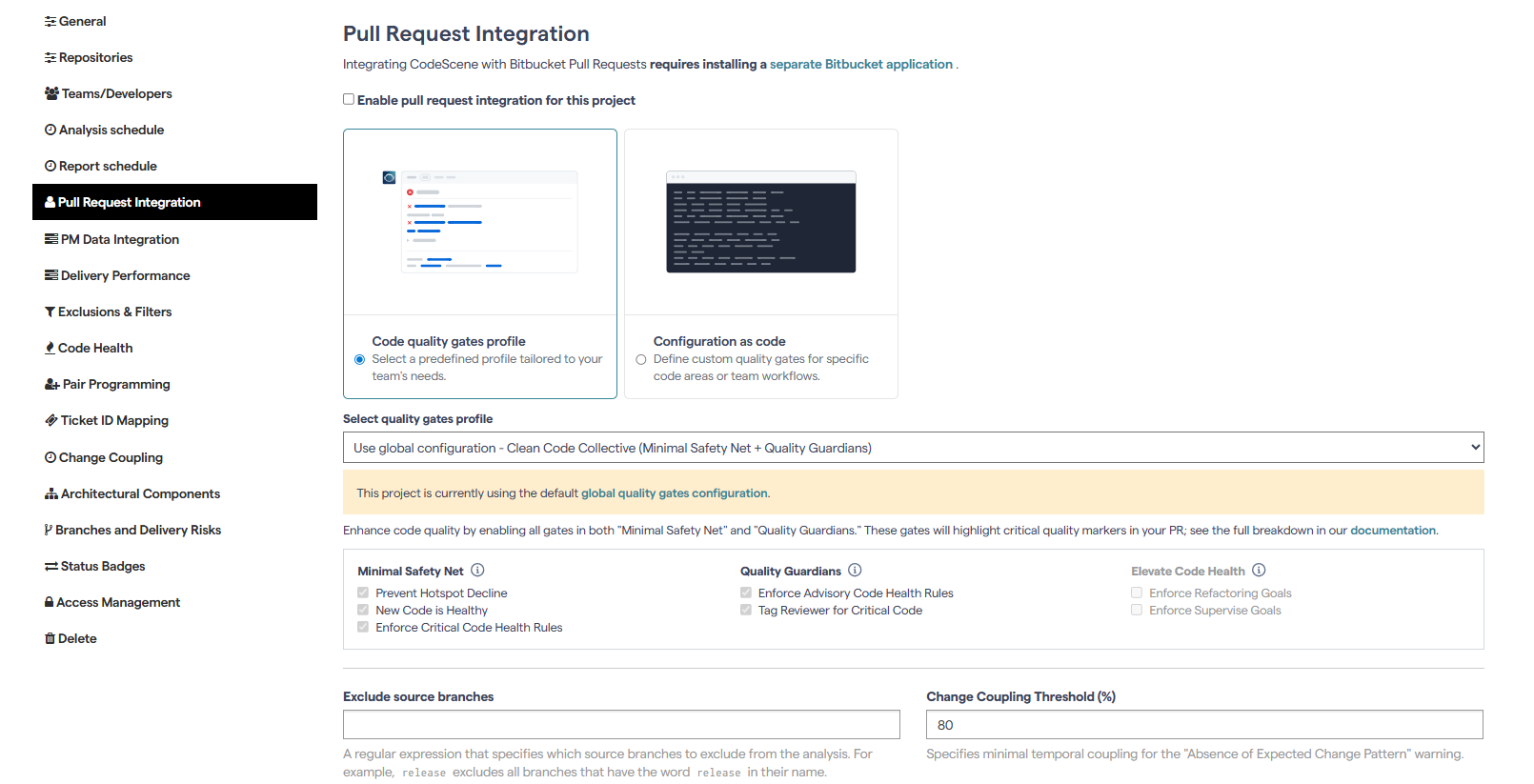
This is where you’ll set up how CodeScene communicates with Bitbucket and defines the analysis behavior for incoming Pull Requests.
Step 2: Install the Bitbucket Application
To enable the integration, install the CodeScene Bitbucket application.
This application allows CodeScene to securely access and analyze your Pull Requests.
Once installed, CodeScene will automatically receive notifications whenever new PRs are opened or updated in your Bitbucket repository.
Step 3: Enable Pull Request Integration
Check the option “Enable pull request integration for this project.”
Select the Quality Gates profile you want to apply.
Quality Gates determine which checks CodeScene enforces, such as code health degradation or hotspot risk thresholds.
You can:
Use custom project-level settings to fine-tune thresholds per project, or
Rely on the global quality gates configuration, which defines default standards across all projects.
When finished, click Update to save your configuration.
Step 4: Configure Commenting and Reporting Options
CodeScene provides several options for how analysis results appear in your Bitbucket Pull Requests:
Pull Request Comments
Analysis results can be posted directly as comments in the Pull Request.
By default, CodeScene does not comment on every PR, but you can enable this behavior if desired.
Build Status Integration
CodeScene can post a Build Status on your Pull Requests.
You can configure Bitbucket to require this status to pass before a merge is allowed - effectively using it as a Quality Gate.
Code Insights Report
CodeScene can also post a Code Insights Report summarizing analysis results.
A negative report (e.g., when code quality decreases) will not automatically block merges, but it provides valuable insight for reviewers.
Annotations in Code Insights Report
If the Code Insights Report is enabled, CodeScene can add annotations to specific lines in files, highlighting where degradations or improvements occurred.
Step 5: Test the Integration
To verify everything works as expected:
Create a new Pull Request in Bitbucket.
CodeScene will automatically analyze the changes and post the results - either as PR comments, a Build Status, or a Code Insights Report, depending on your configuration.
✅ With this setup, CodeScene becomes an integral part of your Bitbucket development workflow.
It ensures your team maintains high-quality, maintainable code while catching potential problems early - directly within your Pull Request process.