Integrating CodeScene with Azure DevOps Pull Requests
CodeScene can be integrated directly into your Azure DevOps workflow to provide automated code reviews and quality gates on Pull Requests. This enables your team to catch potential issues early and ensure code quality before merging.
CodeScene integrates with Azure DevOps Pull Requests by installing a subscription in the project’s Service Hooks.
Step 1: Open Pull Request Integration Settings
Navigate to your project configuration in CodeScene.
Go to the Pull Request Integration tab.
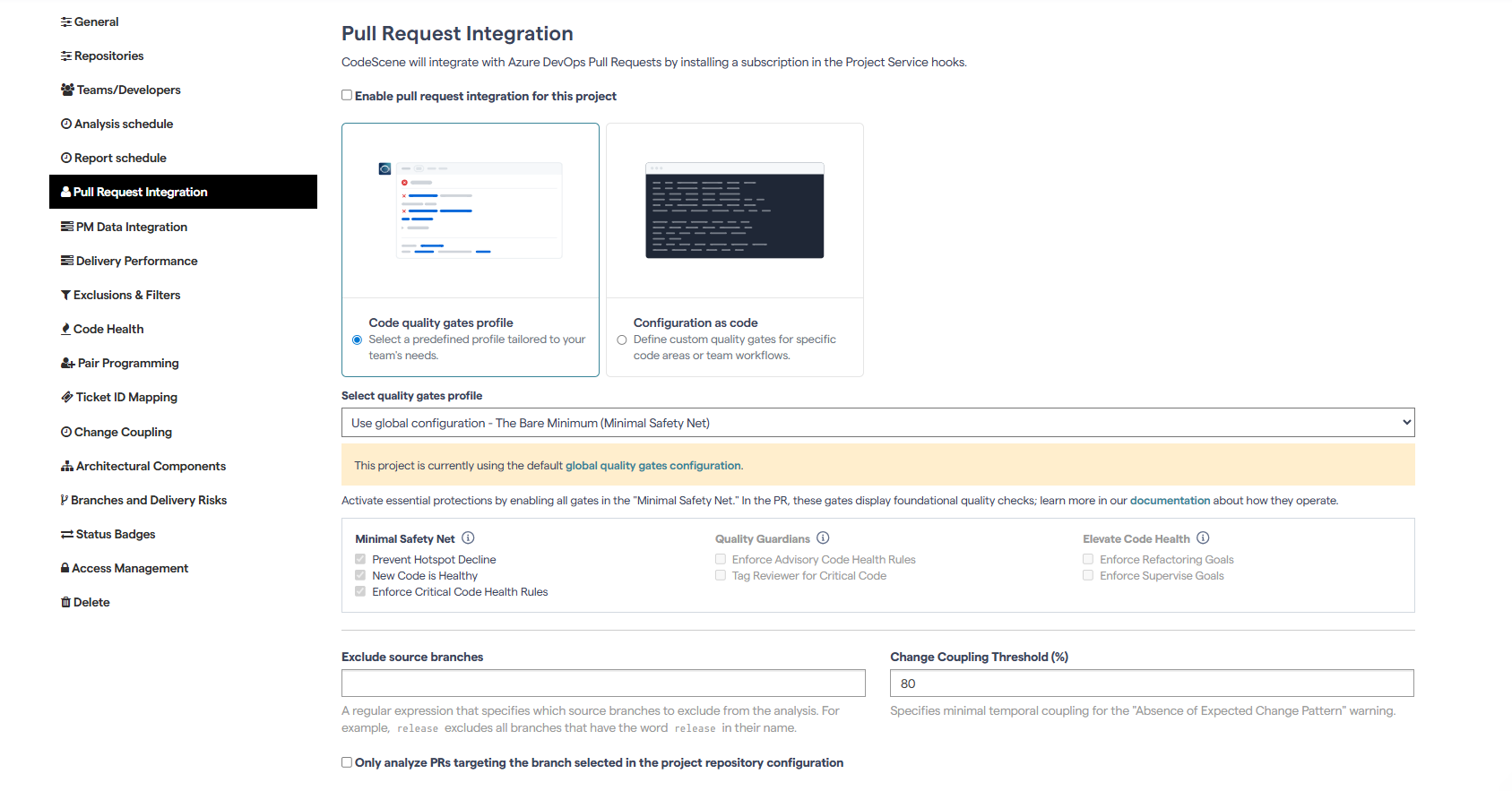
Step 2: Enable PR Integration
Check the box: Enable pull request integration for this project.
Select the desired Quality Gates profile to define which checks CodeScene should enforce.
You can customize these settings at the project level to better align with your specific needs, or use the global quality gates configuration as a default standard across all projects.
Click Update to save your changes.
Step 3: Configure Commenting Options
Analysis results will be posted directly as comments in your Azure DevOps Pull Request. You can control how CodeScene comments using the following options:
Always comment on all Pull Requests
By default, CodeScene only comments on Pull Requests that:
Fail a quality gate,
Have an increased risk where a more detailed review is recommended, or
Trigger any warnings.
Enabling this checkbox makes CodeScene comment on all Pull Requests, including low-risk ones, providing continuous insights on every change.
Add threads to specific file locations
Instead of posting a single summary comment, CodeScene can add discussion threads to specific lines in files where code degradations or improvements were detected.
Set thread status to “Active” for degradations
By default, CodeScene sets comment thread status to Active for findings that degrade Code Health. You can adjust this behavior if desired.
Set main comment status to “Active” for high-risk Pull Requests
When enabled, Pull Requests identified as high risk will have the main comment thread marked as Active, even if no degradations are detected.
Step 4: Test the Integration
Create a new Pull Request in Azure DevOps.
CodeScene will automatically analyze the changes and provide feedback directly in the PR through comments and review summaries.
✅ With this setup, CodeScene becomes an integrated part of your Azure DevOps development workflow, helping your team maintain and improve code quality at every step -before the code is merged.