How to customize Code Health rules with .codescene/code-health-rules.json
With Custom Code Health rules, you can tailor CodeHealth for YOUR organisation to eliminate noise, focus on what matters in your context, and maintain alignment between code quality metrics and business objectives.
This guide explains how to customize CodeScene’s Code Health rules by using the repository configuration file:
.codescene/code-health-rules.json
Use this feature for exceptional cases only. CodeScene’s default Code Health rules are carefully calibrated, so broad customizations can make code appear healthier without improving its maintainability. In most cases, threshold adjustments are a better choice than disabling rules entirely.
By the end of this guide, you will know how to:
create the configuration file
start from the official CodeScene template
adjust rule weights
override supported thresholds
apply different settings to different parts of a repository
order multiple rule sets correctly
verify that your overrides are being applied
avoid the most common mistakes
File location
Store the configuration in your repository as:
.codescene/code-health-rules.json
The file must be committed to the repository.
If the file does not exist in this location, CodeScene uses the default Code Health configuration.
Always start from the CodeScene template
The safest way to create the configuration file is to download the template generated by CodeScene.
The template includes:
supported rule names
supported threshold names
inline documentation inside the JSON file
Start from that template instead of creating the file manually. This helps ensure that only valid rule names, threshold names, and fields are used.
Template location → In the CodeScene UI:
Project Configuration → Code Health → Download Template (JSON)
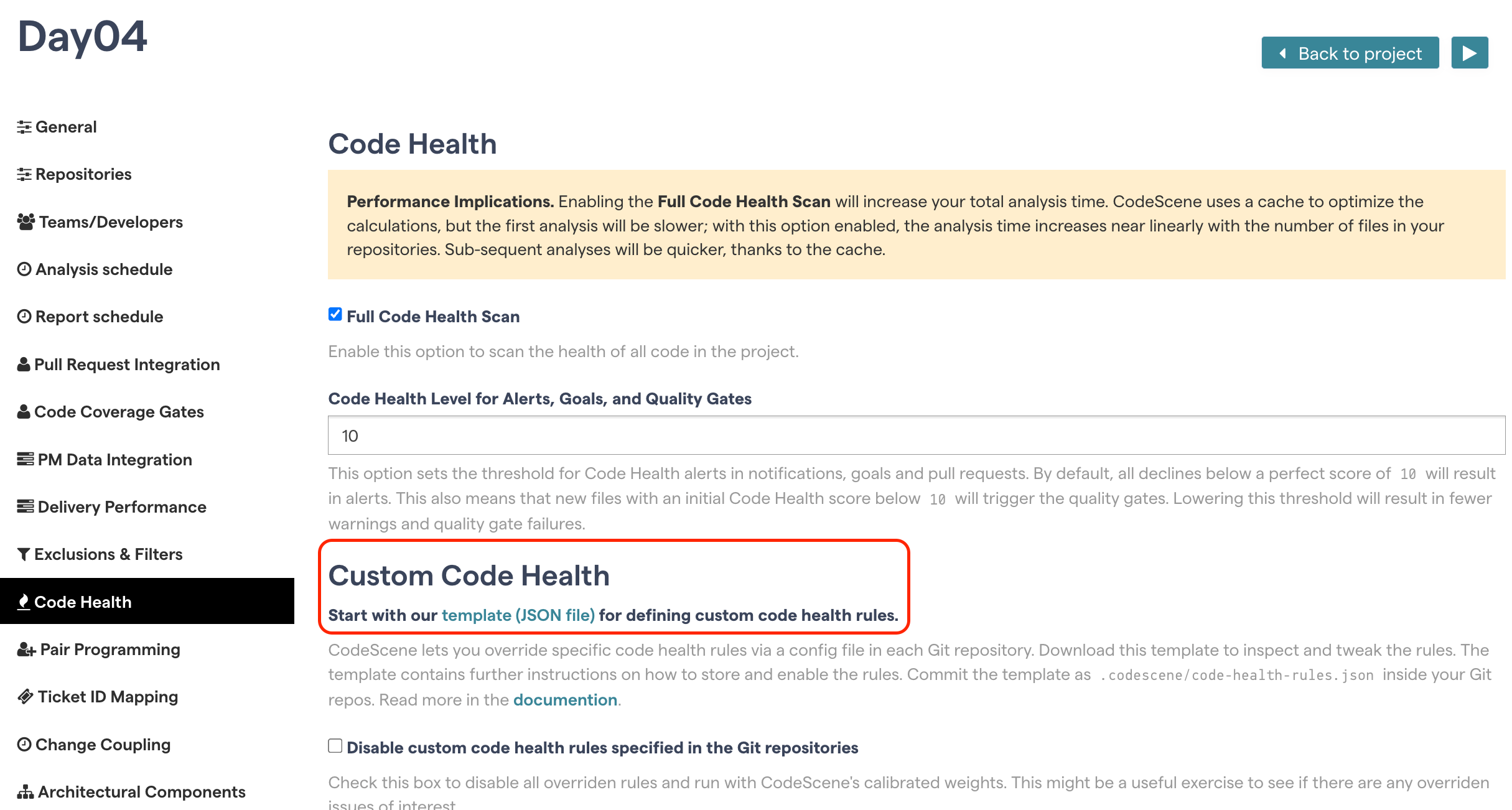
After downloading the template:
keep only the rules and thresholds you want to override
remove all entries you do not want to change
commit the result as
.codescene/code-health-rules.json
Configuration structure
The customization logic lives inside rule_sets.
Each rule set defines:
which files it applies to
which rule weights should be overridden
which thresholds should be overridden
A rule set contains these main fields:
The CodeScene template may also include helper fields such as usage, matching_content_path_doc, and thresholds_doc.
Template-style structure example
{
  "usage": "Persist this file inside your repository as .codescene/code-health-rules.json. Keep only the rules and thresholds you want to override.",
  "rule_sets": [
    {
      "matching_content_path": "**/*",
      "matching_content_path_doc": "Specify a glob pattern relative to the repository root.",
      "rules": [
        {
          "name": "Brain Method",
          "weight": 1
        }
      ],
      "thresholds": [
        {
          "name": "constructor_max_arguments",
          "value": 10
        }
      ],
      "thresholds_doc": "The thresholds let you redefine the details of selected code health issues."
    }
  ]
}
Use the downloaded template from your own CodeScene instance as the source of truth for the exact supported names available in your version.
Rule weights
Each rule in the rules section has a weight value.
Common values are:
A lower weight keeps the rule active but reduces its influence on the Code Health score.
A weight of 0.0 disables the rule completely for the matching files.
Example: reduce one rule and disable another
{
  "usage": "Persist this file inside your repository as .codescene/code-health-rules.json. Keep only the rules and thresholds you want to override.",
  "rule_sets": [
    {
      "matching_content_path": "test/**",
      "matching_content_path_doc": "Specify a glob pattern relative to the repository root.",
      "rules": [
        {
          "name": "Brain Method",
          "weight": 0.5
        },
        {
          "name": "Large Method",
          "weight": 0
        }
      ],
      "thresholds": [],
      "thresholds_doc": "The thresholds let you redefine the details of selected code health issues."
    }
  ]
}
This configuration means:
Brain Methodstill affects Code Health, but with reduced impactLarge Methodis disabled for files matchingtest/**
Removing a rule is not the same as disabling it
There is an important difference between removing a rule from the JSON file and disabling it.
When a rule is disabled:
it no longer affects Code Health
it does not appear in the virtual code review
it is excluded from delta analyses and PR quality gates
That is why it is usually better to remove unused entries from the template instead of keeping rules you are not actually overriding.
Threshold overrides
Thresholds determine when a rule starts to trigger.
For example, thresholds can define:
how complex a function must be
how large a file must be
how deep nesting must be
how strict duplication checks should be
Use threshold overrides when you want finer control without disabling a rule completely.
Example: relax thresholds for test code
{
  "usage": "Persist this file inside your repository as .codescene/code-health-rules.json. Keep only the rules and thresholds you want to override.",
  "rule_sets": [
    {
      "matching_content_path": "test/**",
      "matching_content_path_doc": "Specify a glob pattern relative to the repository root.",
      "rules": [],
      "thresholds": [
        {
          "name": "function_cyclomatic_complexity_warning",
          "value": 10
        },
        {
          "name": "function_nesting_depth_warning",
          "value": 3
        }
      ],
      "thresholds_doc": "The thresholds let you redefine the details of selected code health issues."
    }
  ]
}
This configuration adjusts supported thresholds for files inside test/** while leaving all rule weights unchanged.
Customizing duplication thresholds
CodeScene also supports duplication-related threshold overrides.
Examples include:
function_duplication_min_lines_of_code_for_checkfunction_duplication_min_similarity_percentage
Example: make duplication checks less aggressive in tests
{
  "usage": "Persist this file inside your repository as .codescene/code-health-rules.json. Keep only the rules and thresholds you want to override.",
  "rule_sets": [
    {
      "matching_content_path": "test/**",
      "matching_content_path_doc": "Specify a glob pattern relative to the repository root.",
      "rules": [],
      "thresholds": [
        {
          "name": "function_duplication_min_lines_of_code_for_check",
          "value": 15
        },
        {
          "name": "function_duplication_min_similarity_percentage",
          "value": 85
        }
      ],
      "thresholds_doc": "The thresholds let you redefine the details of selected code health issues."
    }
  ]
}
This lets you tune duplication detection for specific paths without turning the rule off completely.
Understanding matching_content_path
Multiple rule sets: first match wins
When multiple rule sets are defined, CodeScene evaluates them from top to bottom.
For each file:
CodeScene checks the first rule set
if the file matches
matching_content_path, that rule set is appliedevaluation stops
later rule sets are ignored
Rule sets do not merge.
This means rule ordering is critical.
Correct ordering strategy
Always order rule sets like this:
most specific paths first
broader paths later
**/*last as the fallback pattern
If the same threshold or rule override should apply in both a specific scope and a general scope, you must repeat it in both rule sets.
Correct example
{
  "usage": "Persist this file inside your repository as .codescene/code-health-rules.json. Keep only the rules and thresholds you want to override.",
  "rule_sets": [
    {
      "matching_content_path": "test/**",
      "matching_content_path_doc": "Specify a glob pattern relative to the repository root.",
      "rules": [
        {
          "name": "Code Duplication",
          "weight": 0
        }
      ],
      "thresholds": [
        {
          "name": "constructor_max_arguments",
          "value": 15
        }
      ],
      "thresholds_doc": "The thresholds let you redefine the details of selected code health issues."
    },
    {
      "matching_content_path": "**/*",
      "matching_content_path_doc": "Specify a glob pattern relative to the repository root.",
      "rules": [],
      "thresholds": [
        {
          "name": "constructor_max_arguments",
          "value": 15
        }
      ],
      "thresholds_doc": "The thresholds let you redefine the details of selected code health issues."
    }
  ]
}
In this example:
files in
test/**get the test-specific duplication overridethey also get
constructor_max_arguments = 15because that threshold is repeated in the first rule setall other files use the fallback
**/*rule set
Global rules across repositories
In multi-repository projects, CodeScene can also use one repository as the source of global Code Health rules for the whole project.
The precedence is:
local repository rules in
.codescene/code-health-rules.jsonproject-level global rules
default CodeScene rules
Important notes:
the repository containing the global rules must be part of the project
local repository rules always take precedence over global rules
after changing global rules, run a full analysis before expecting those changes to affect delta analyses
Most teams should start with local repository rules and only use global rules when they need shared project-wide defaults.
How to verify that your overrides are applied
After the next analysis, verify the configuration in CodeScene:
overridden rules are listed under Scope → Analysis Data → Overridden Code Health Rules
overridden thresholds are shown in the virtual code review for impacted files
This is the easiest way to confirm that the expected rule set matched and that your overrides are in effect.
Common mistakes
Using custom rules too broadly
Custom Code Health should be used for exceptional cases. Broad overrides can make scores look better without improving the underlying code.
Putting **/* first
If **/* appears before more specific rule sets, it matches everything and prevents later rule sets from being applied.
Expecting rule sets to merge
They do not merge. Only the first matching rule set is applied.
Forgetting to duplicate shared overrides
If the same threshold or rule weight should apply in both specific and general scopes, repeat it in both rule sets.
Using the wrong rule or threshold name
Rule names and threshold names must match the downloaded template exactly.
Forgetting case sensitivity
test/** and Test/** are different patterns.
Trying to use multiple patterns in one rule set
Each rule set supports only one matching_content_path.
Saving the file in the wrong location
The file must be committed as .codescene/code-health-rules.json.
Quick checklist before committing
Before committing the file, verify that:
the file is named
.codescene/code-health-rules.jsonyou started from the downloaded CodeScene template
you removed rules and thresholds you are not overriding
rule names and threshold names were copied exactly from the template
specific rule sets appear before broader ones
**/*appears last if used as a fallbackshared overrides were duplicated where necessary
glob patterns use forward slashes
the JSON syntax is valid
Key points to remember
The configuration file must be committed as
.codescene/code-health-rules.jsonAlways start from the official CodeScene template
Remove entries you are not overriding
weight: 0.0disables a rule completely for matching filesThreshold overrides are often better than disabling a rule
matching_content_pathuses case-sensitive glob patternsOnly the first matching rule set is applied
Local repository rules override project-level global rules
By following these steps you can balance the signal-to-noise ratio. Get relevant, actionable information that translates directly into business value without overwhelming teams with low-priority findings. Use Custom Code Health with caution and not as a means to turn CodeHealth into a vanity metric.