3-Step Developer Onboarding Guide
If you're using AI-assisted coding, benefit from AI acceleration without changing anything you do already. Two things run quietly in the background to guardrail your AI tool and your commits: the CodeScene MCP Server and the CodeScene CLI.
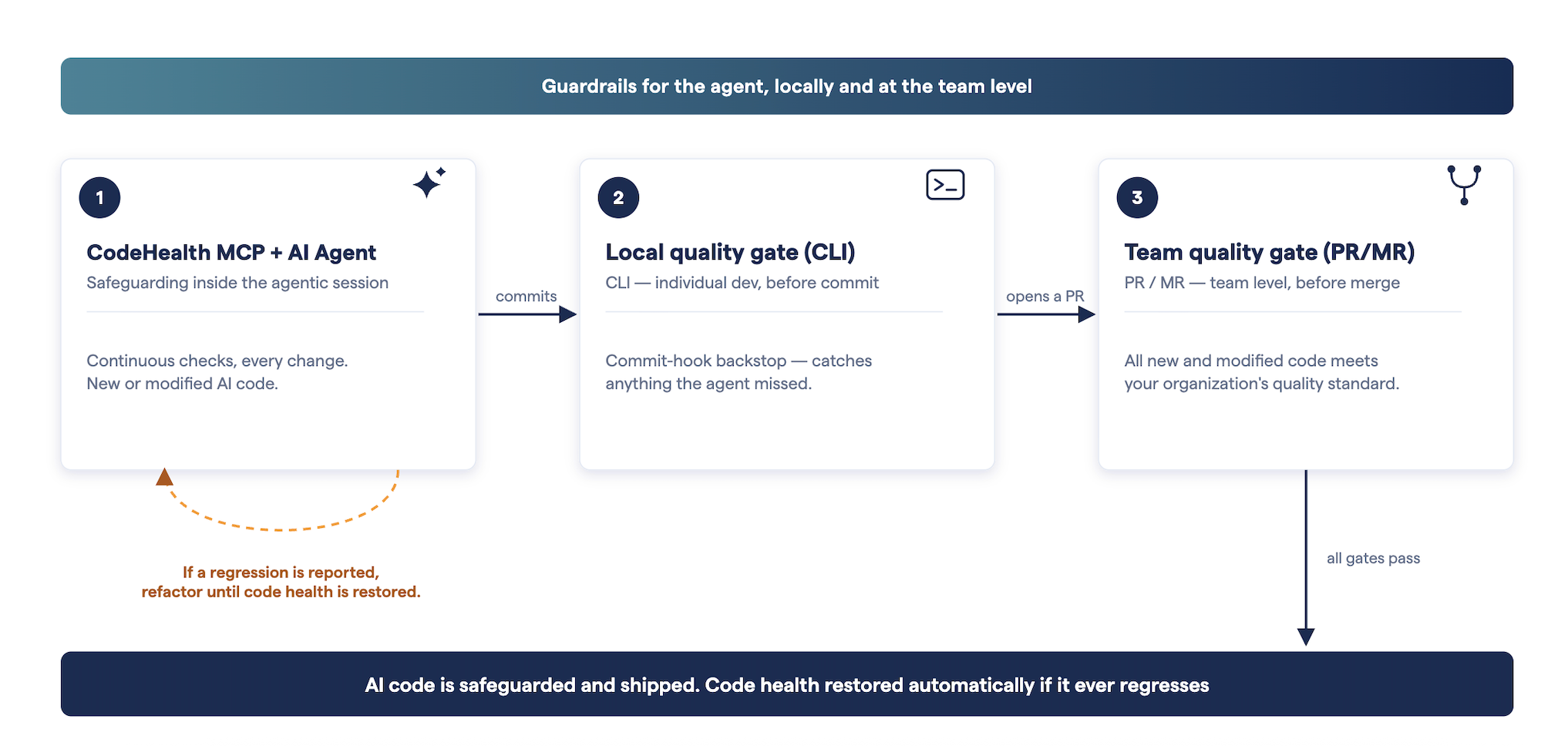
Coding agentically, where your AI tool drafts and commits changes with little manual review?
Install the MCP Server + CLI Tool. The MCP Server gives your AI tool Code Health context before it writes a line; the CLI is your deterministic backstop. A Git commit hook catches issues no matter how the commit happens. E.g. You typing git commit yourself or the agent committing mid-session. Go further by wiring the CLI into your agent's own hooks (Claude Code's Stop event, for example), so it's checked before the agent even hands control back to you.
Coding semi-manually, where you write and review the code yourself with AI as an assistant rather than an autonomous agent?
Install the MCP Server + IDE Extension + CLI Tool. The CLI shortens the feedback loop by catching Code Health regressions so you don't have to wait for Pull Request checks, and the IDE extension adds real-time feedback as you type which matters most when a human is doing the typing. That includes committing from your IDE's Git panel where even with an AI-generated commit message (VS Code, Cursor, and similar), the commit happens outside any agent session. If the CLI flags something, fixing it is on you by hand, or by handing it to AI chat.
Step 1: Install CodeScene’s MCP Server
If you’re using AI-assisted coding, benefit from AI acceleration without the risks without changing anything you do already. The MCP instantly transforms tools like GitHub Copilot and Claude from simple code generators into an engineering partner that understands and protects code quality.
Important: Make sure to copy the AGENTS.md guidance into your repository. If this step is missed, the MCP server will be installed but your AI-tooling will not call it.
Step 2: Install CodeScene’s CLI Tool
The CLI is a deterministic quality gate which catches Code Health regressions before they leave your machine, whatever wrote them. You can trigger it two ways:
Git commit hooks: Live in
.git/hooksand fire on Git's own eventsgit commit,git push. They catch every commit, including the ones you make by hand, which makes them a solid backstop. The tradeoff: they only fire once code is already staged, so when one blocks an autonomous agent's commit, you have to notice and start a new prompt to fix it.AI Agent hooks: Run on your coding agent's own lifecycle instead, before or after a tool call, when you submit a prompt, or when the agent finishes responding. Claude Code, Cursor, and VS Code's agent tooling all expose a
Stopevent that fires right before the session ends. Wire the CLI into it and the agent checks its own work against your CodeScene rules before it ever hands control back to you, no extra cycle needed.
Agentic Workflow Setup
Add a pre-commit hook so commits that would lower Code Health are blocked before they leave your machine, interactively with cs delta --interactive --staged, or non-interactively (CI, scripted hooks) with cs delta --git-hook --staged. See Run the CLI in a Git pre-commit hook for the full setup.
For an agentic workflow, add a Stop hook alongside it. In Claude Code, that's a project's .claude/settings.json:
{
  "hooks": {
    "Stop": [
      {
        "hooks": [
          { "type": "command", "command": "cs delta --git-hook --staged" }
        ]
      }
    ]
  }
}
Cursor and VS Code's Copilot agent tooling support the same idea under their own stop / Stop hook.
Manual Coding Setup
Add a Git pre-commit hook so commits that would lower Code Health are blocked before they leave your machine, interactively with cs delta --interactive --staged, or non-interactively (CI, scripted hooks, or an agent hook) with cs delta --git-hook --staged. See Run the CLI in a Git pre-commit hook for the full setup.
Step 3: Install CodeScene’s IDE Extension
Needed if you're coding semi-manually. Get real-time IDE feedback and a Code Health Monitor feature that flags code health issues early, ensuring clean commits every time.
Optional: Enrol in CodeScene Academy CodeScene Academy
Lead the future of software excellence by mastering technical debt, CodeHealth™, and AI-driven development for guardrailing and elevating codebases that aren't yet AI-ready. All while earning globally recognised certifications.
Optional: Watch Adam Tornhill’s Presentation
“Writing Code for the Human Brain: Optimize Code for Cognitive Bottlenecks.” Adam looks at code from the perspective of the human brain starting from common problem constructs like null references, edge cases, and complex conditional logic, to unpack their cognitive costs and consequences.
Was this helpful?
Still need help? Ask the team