What to Do If You Can’t Be Added to a CodeScene Organization (GitLab)?
If your CodeScene organization owner or admin can’t find your user when trying to add you to the organization, the most common cause is related to GitLab group membership.
Key Concept: CodeScene Uses GitLab Top-Level Groups
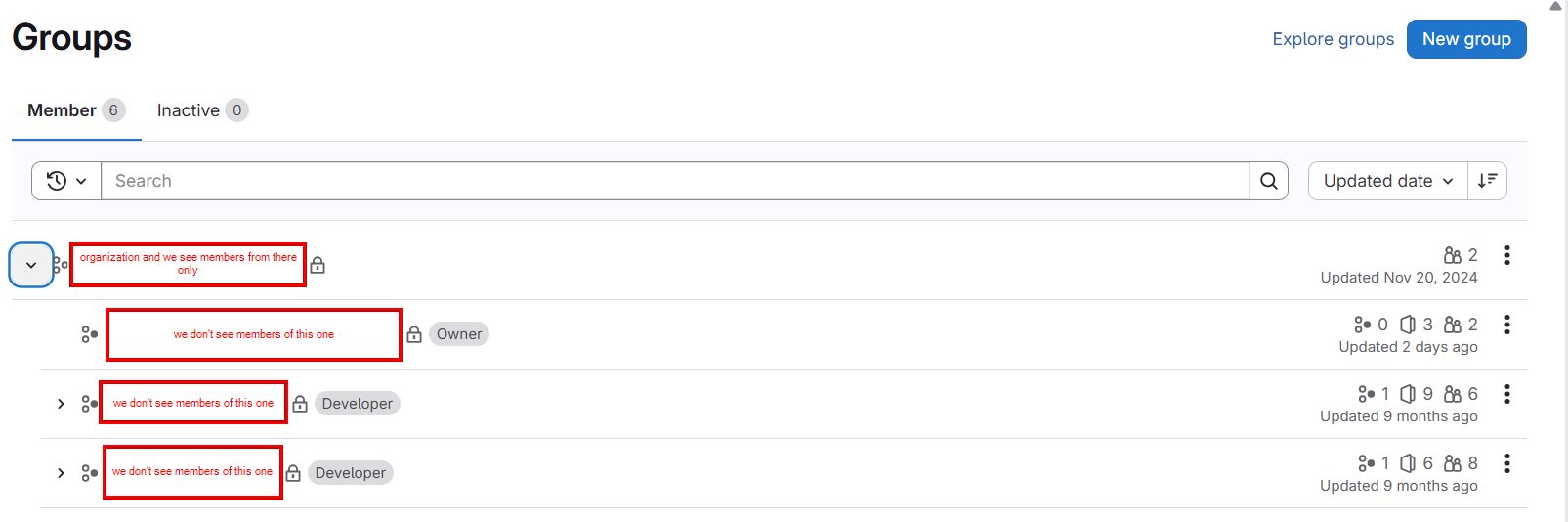
When CodeScene integrates with GitLab, it treats a GitLab top-level group as the organization.
👉 This means only members of the top-level group are visible and eligible to be added to the CodeScene organizational account.
Prerequisite: Be a Member of the Top-Level GitLab Group
Before you can be added to the CodeScene organization:
You must be a direct member of the GitLab top-level group
Being a member of subgroups only is not sufficient
What does not work
Being added only to:
Subgroups
Individual projects under the group
Even if you have full access to repositories through subgroups, CodeScene will not see you unless you are explicitly added to the top-level group.
How to Fix the Issue
Ask your GitLab administrator or group owner to:
Navigate to the top-level group in GitLab
Add you as a direct member of that group
Once added:
Wait a moment for GitLab to reflect the change
Ask the CodeScene admin to retry adding you to the organization
No additional configuration or re-authentication is usually required.
Summary
If you can’t be added to a CodeScene organization when using GitLab:
Ensure you are a direct member of the GitLab top-level group
Subgroup membership alone is not enough
After being added to the top-level group, retry adding the user in CodeScene